
Tens of hours to produce
Photography, writing, layout. Even with a supervisor working late, one manual takes weeks.
Social × Video Marketing
Social Media Management POV Studio Influencer PR Social Ads Management Inbound Tourism Marketing Full-Funnel Marketing Performance-based Recruitment Marketing Japan Market Entry Marketing EC Operations & System IntegrationAI × R&D
AllRev AI Consulting UGC LabProduct × Travel
Travi Travel App Company information MissionTripClear POV Work Intelligence
AI turns first-person video into illustrated work instructions and a browser-based work viewer. Your floor is tied up for half a day, and that is all. Filming, analysis, writing and building the viewer are handled entirely by us.
Neither the footage nor the know-how leaves your organization, so this works on confidential and defense-related processes.
 POV Footage → Auto Manual
Step 6 of 14 · video 8:12–9:26
Tightening screws with a power driver
Power driver / workbench
Over-tightening can damage the screw head or the part
Problem
Photography, writing, layout. Even with a supervisor working late, one manual takes weeks.
The knack lives only in experienced heads. Every retirement and transfer takes skill and know-how with it.
Equipment and procedures change; the manual doesn't. Has yours become a document nobody opens?
The root cause is that recording the work is itself hard labor. That is the part we solve.
How it works
All we ask of you is half a day of filming and a list of your equipment. Everything after that is on us.
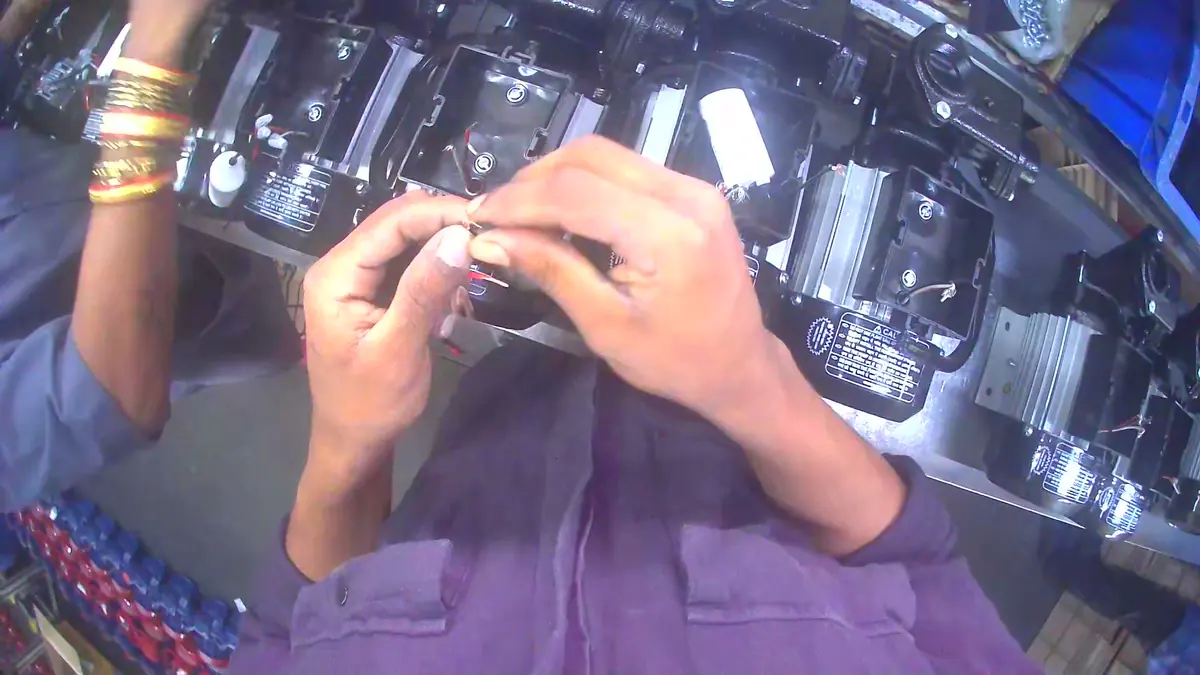
 POV footage from the floor
STEP 1
Our staff film the operator's-eye view on a compact camera. Half a day on site, no more.
Time required: half a day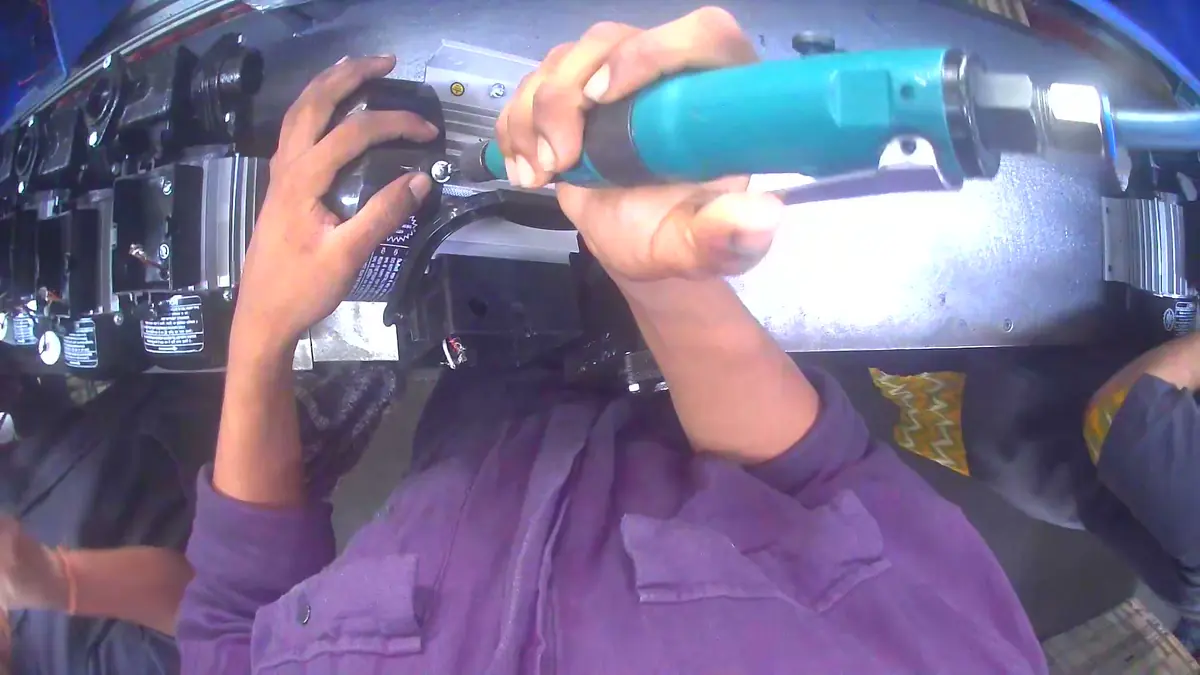
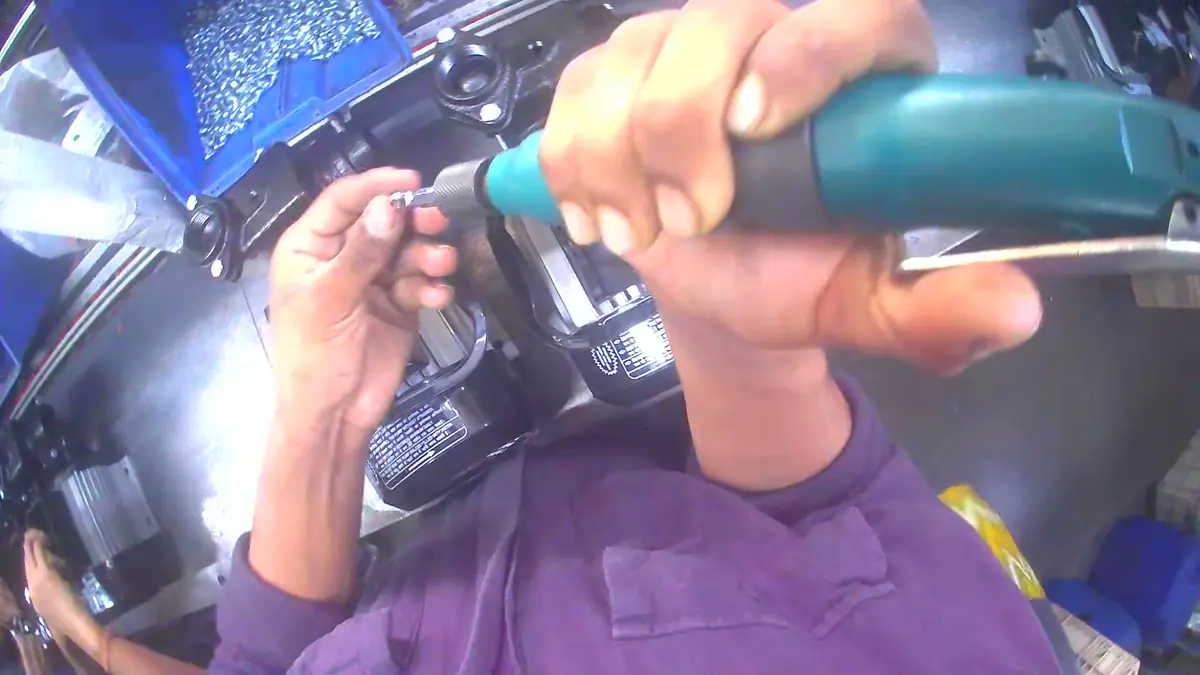
Tightening a screw into the part with a power driver
STEP 2
It reads what is being done, with which tool and where, and organizes it into steps. The footage never leaves your organization.
Nothing for you to do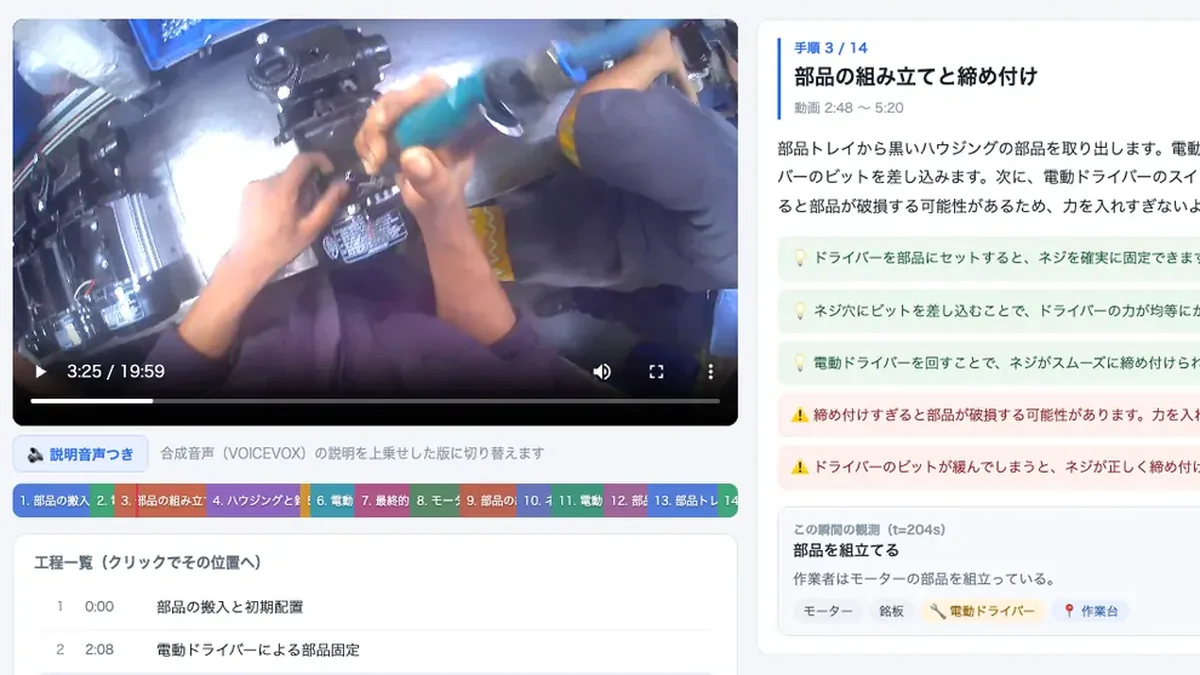 Instructions plus viewer
STEP 3
You get illustrated, printable work instructions and a work viewer that opens in a browser.
Delivery: about two weeksDeliverable
Below is an actual delivered screen. One 20-minute POV video became a 14-step set of instructions. As the video plays, the step, key points and cautions on the right change to match the position. Nothing to install, no internet connection needed.
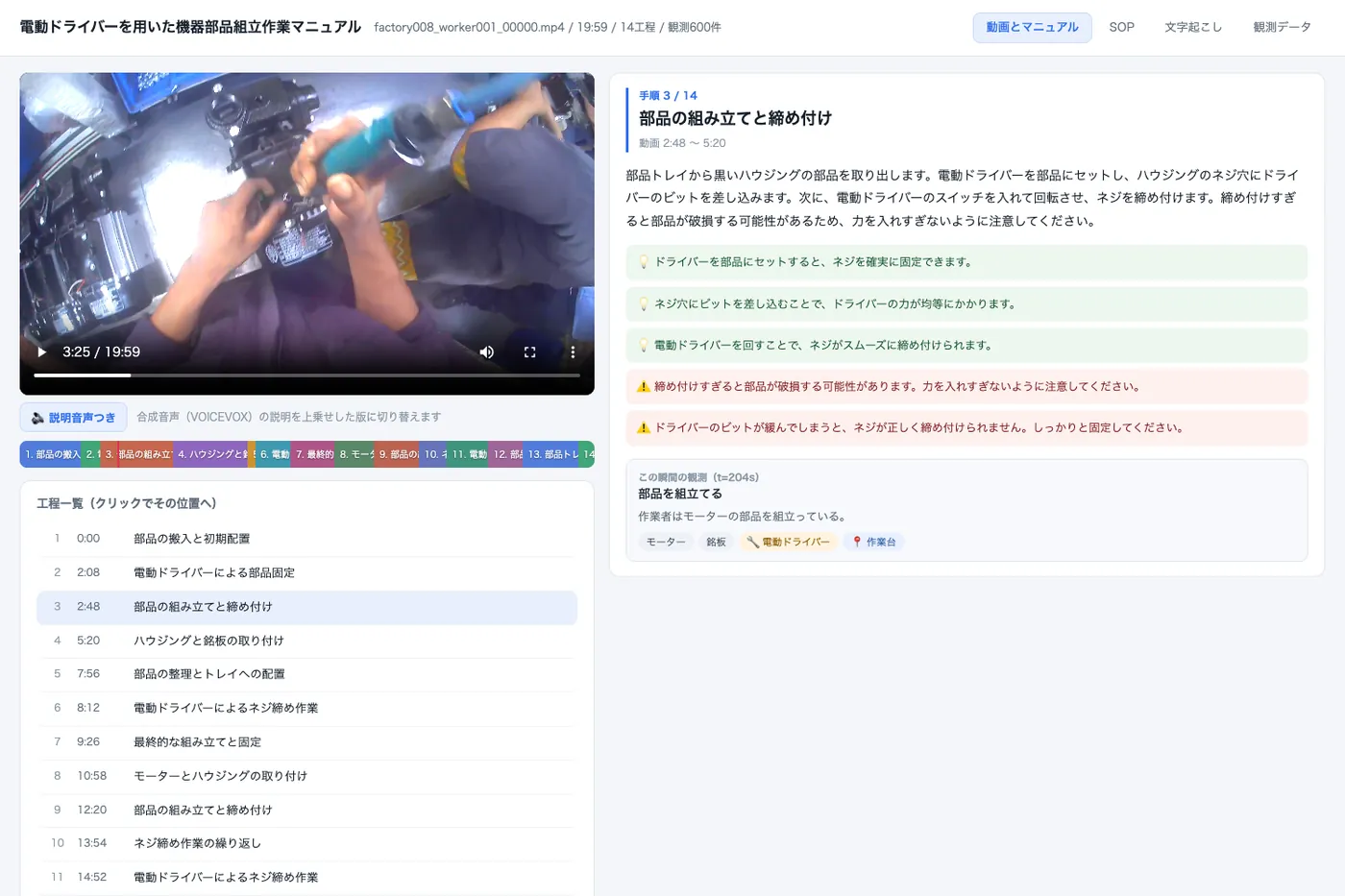
Note: this screen is wide, so it appears scaled down on a phone. Open it in a new tab to see it full size.
Open the demo in a new tabA demo excerpting three steps (3 min 02 sec) from a deliverable generated out of 20 minutes of footage. Click the step bar or the list to jump to that task.
As the footage plays, the current step is shown. The color-coded bar and the step list take you to any task in one click.
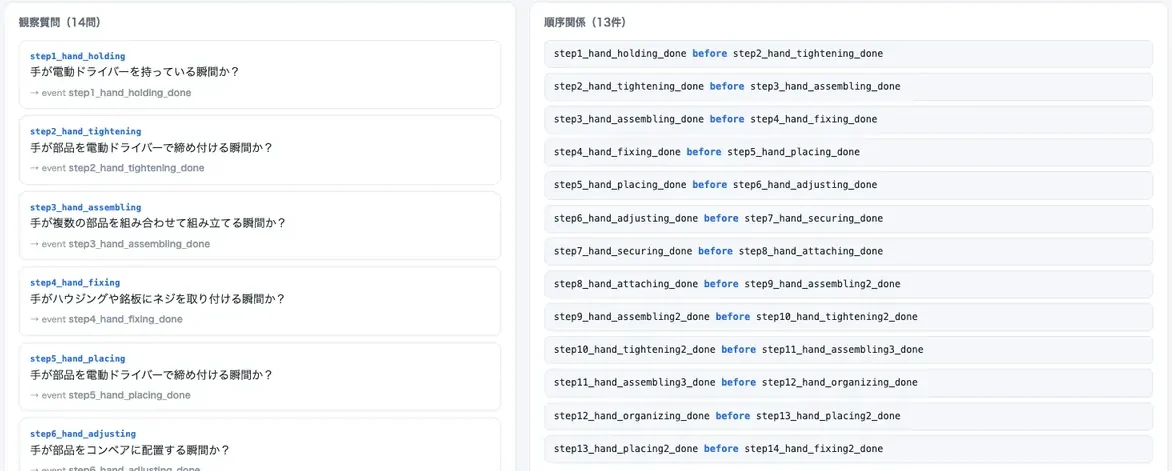
Which step follows which, plus the questions the AI uses to tell one task from another, each defined individually. This is the foundation for automatically checking whether work follows the procedure.
Audio from the floor is transcribed, and a click jumps to that moment. Spoken instructions from experienced staff and working conditions stay on the record.
Every two seconds it records what was being done, with which tool, where and with which hand. You can trace any line of the instructions back to the evidence behind it.
SOP — step order and decision criteria
On the left, the questions the AI uses to identify a task — "is the hand holding a power driver at this moment?" On the right, which step follows which. Defining these one by one means the same definitions can later drive automatic AI review of a new hire's work footage.
Observation data — the evidence behind the instructions
Twenty minutes of footage produces 600 records automatically. Every two seconds captures what was being done, which parts and tools were used, where, and how each hand was used — so every line of the instructions can be traced back to the moment it came from.
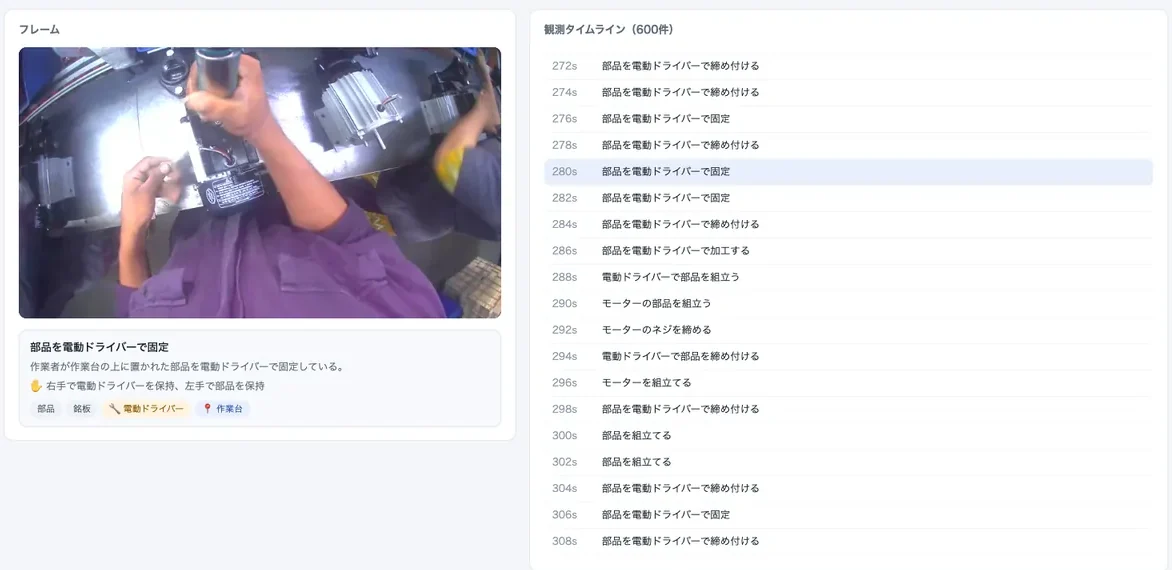
Note: both are cropped from the delivered screen. They appear scaled down on a phone, so tap to enlarge.
Note: the screens shown are samples created during our own technical validation. They analyze publicly available research footage of manufacturing work from an operator's viewpoint (Egocentric-10K); actual deliverables are built from footage shot at your site. Because that footage has no audio, the transcript tab is omitted from the demo. On a site with audio, it appears in the delivered screen.
What you get
The instructions and the viewer, of course — and also the work data the AI read out of the footage. Once handed over, all of it is yours.
20min
of POV footage, one video
14steps
extracted automatically
14photos
one cropped for each step
600records
of work, every two seconds
What the illustrated work instructions include
Photos cropped from the actual footage
Hand position and orientation are obvious at a glance.
Key points and safety cautions
The reason for each step and its safety cautions, written out.
Timing laid out
Each step's duration and its position in the video.
Print, PDF and checklists
Works as a printed notice, a shared PDF or an end-of-shift check.
For each task, you get this one folder in its entirety
Work viewer
Double-click the icon and it opens in your usual browser
Illustrated work instructions
Print or export to PDF and post it on the floor as is
Work footage
Two versions: the original footage, and one with narration added
Photos per step
One per step (14 in the sample). Reuse them in your own documents freely
The work data the AI read
Import it into your training system or document management and use it there
A guide to reading it
One page on how to open everything, so nobody is lost on first use
Getting started
No app to install, no changes to your internal systems, no internet connection. Put it on a shared folder or a USB stick and it opens on any PC on the floor.
Narrated version included
A version with synthesised narration of each step is included. A button toggles audio on and off, so it works directly for training new staff.
Posting on paper or as PDF
The instructions print and export to PDF with photos intact, ready to post on the floor or use as an end-of-shift checklist.
Revisions
When equipment or procedure changes, you just refilm that step. There is no document to rewrite. (Handled monthly on the Standard plan.)
Rights to the data
Analysis results are handed over as text data that opens without special software. Import it into your training or document management systems and adapt it however you like.
Review before delivery
The instructions and decision criteria are AI-generated drafts. They are finalised once your floor supervisor's review has been incorporated at delivery.
Why TripClear
Neither footage nor know-how leaves your company
Analysis happens entirely inside your organization, or on an air-gapped machine of ours. Footage is never sent to an external AI service. This works on confidential and defense-related processes.
It learns your equipment names and your terminology
From your equipment list and your footage we train an AI specific to you. The more it is used, the more the instructions read in your own vocabulary. In measured testing, training improved recognition accuracy by a factor of 2.6.
Professional POV crews come to your site
The filming technique we developed making social video keeps your floor tied up for only half a day. Filming, analysis, writing and the viewer are all ours to handle.
Proof
2.6×
Improvement in task recognition accuracy
The improvement when the AI is trained on your equipment names and footage, versus before training
100%
Step coverage
Every step in the validation footage was detected, with none missed
2weeks
From filming to delivery
Half a day of filming and an equipment list; everything after that is ours
Note: results from technical validation we ran in July 2026, using operator's-eye footage of manufacturing work. The figures were measured under those conditions and will vary with the conditions on your floor.
Price
Start with a single task. The trial shows you what a manual the floor actually uses looks like.
Trial
¥150,000 and up
One task, one-off
Standard
¥500,000 and up
+ ¥50,000/month
Enterprise
Quoted individually
Designed to your requirements
Note: prices are indicative and exclude tax. They vary with the number of tasks and site conditions, so for a detailed quote please Contact us .
Onboarding
Week 0
We confirm the tasks and site conditions, and provide a quote
Week 1
Our staff visit. Your floor is tied up for half a day only
Weeks 1–2
Analysis, writing, then building the viewer — all on our side
Week 2
Finalised once your floor supervisor's review is incorporated
What you need to provide
Note: with a name list, the instructions use your own vocabulary and the AI's recognition accuracy improves.
On the trial plan, half a day of filming and two weeks gets you a manual the floor will actually use.
Where this service is heading
AI audits a new hire's work footage, detecting missed steps and out-of-order work automatically
The same footage generates instructions in multiple languages for international staff
A compact device on the floor analyzes work continuously, making recording and improvement part of the daily routine
Get in touch
Free consultations and quotes available